WordPress plugin · Built for Elementor
Fix every image on your site from one list.
Let AI write the alt text.
AltSweep is three tools in one: a bulk editor for every image's title, alt text, caption and description; a full-site scan that finds where every image is used and which ones can go; and AI suggestions written for SEO, AEO and GEO, so search engines and AI answer engines understand your images.
✓ One-time payment · ✓ Instant download · ✓ 14-day refund
Three tools in one plugin
Edit, sweep, and optimize every image
1
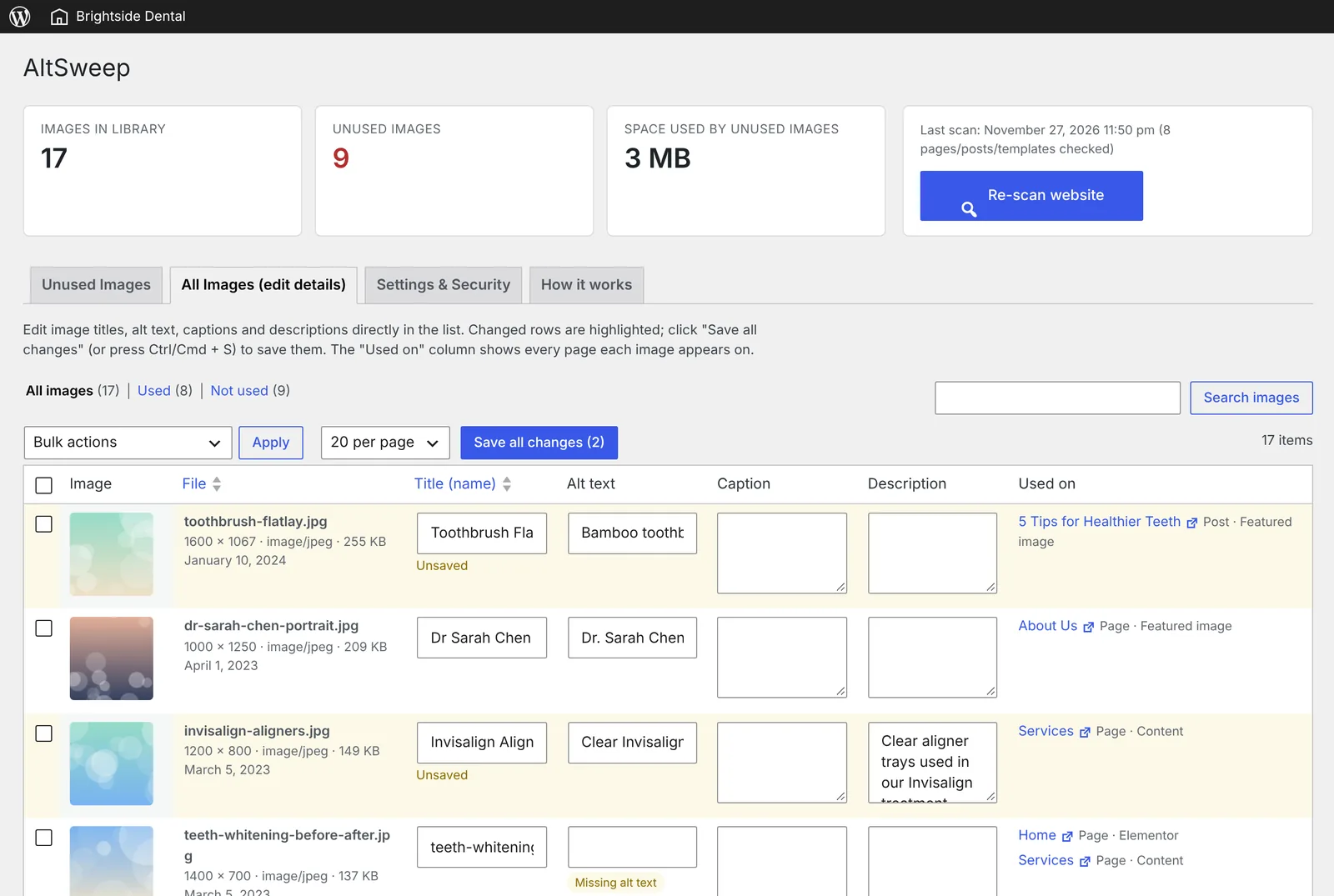
Bulk-edit every image in list view
Every image in your Media Library in one editable list. No more opening images one at a time.
✓ Title, alt text, caption and description side by side
✓ Images missing alt text flagged
✓ Changed rows highlighted; save them all at once
✓ Search and filter by used or unused
2
Scan your whole site and sweep out unused images
Finds every place each image appears, then highlights the ones that aren't on your website anymore and are safe to delete.
✓ Checks Elementor, Gutenberg, WooCommerce, widgets and theme settings
✓ "Used on" shows every page each image is on
✓ Unused images listed with the space they take up
✓ Bulk delete with a safety double-check
BUILT FOR AI SEARCH
3
AI image details for SEO, AEO & GEO
Claude looks at each image and the page it's on, then suggests alt text, titles and descriptions that help your images get found, whether people search on Google or ask an AI.
SEO
Image search and on-page relevance in Google
AEO
Clear, direct descriptions for answer engines and voice assistants
GEO NEW
Specific, factual image text that AI engines like ChatGPT, Perplexity and Google AI Overviews can understand and cite
Missing alt text
Alt text is what screen readers read aloud and what search engines use to understand your images. Most sites have hundreds of images without it.
One image at a time
WordPress makes you open each image separately to edit its details. Fixing a whole library that way takes days.
Years of unused uploads
WordPress doesn't track where an image is used, so old images pile up, eating hosting space and slowing backups. Elementor makes it even harder to tell.
Features
Everything you need to manage your Media Library
Built for real sites with years of content, page builders and plugins.
Bulk-edit every image in one list
Change titles, alt text, captions and descriptions for every image right in the list, then save them all at once. Images missing alt text are flagged.
AI suggestions for SEO, AEO & GEO
Claude looks at each image and the pages it's on, then writes alt text, a clean title and a description for search engines and AI answer engines. You approve every change, and any change can be undone.
See where every image is used
A "Used on" column lists every page, post or template each image appears on, with links to edit or view it.
Deep site scan
Checks Elementor widgets, galleries, backgrounds and templates, plus Gutenberg blocks, the classic editor, featured images, WooCommerce, ACF, widgets, the logo and theme settings.
Safe bulk delete
Delete selected or all unused images. Every resized copy is removed too, and each image is double-checked just before it's deleted.
"Keep" list and CSV export
Protect images used outside WordPress (emails, other sites) so they're never deleted, and export the unused list before you clean up.
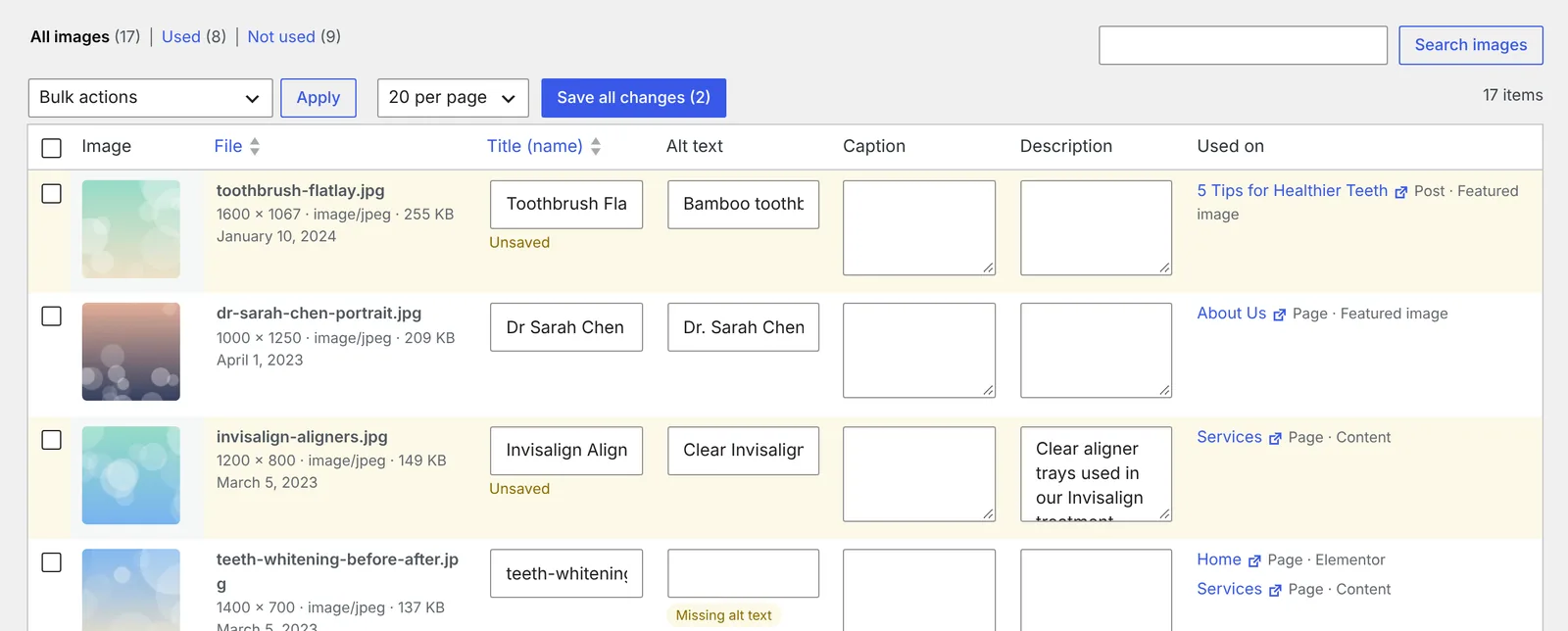
Bulk edit
Fix titles and alt text for every image, fast.
The All Images screen puts every image's title, alt text, caption and description in one editable list, next to the pages it's used on.
✓ Replace camera names like "DSC_1142" with real titles
✓ Spot every image that's missing alt text
✓ Changed rows are highlighted; save them all at once
Clean up
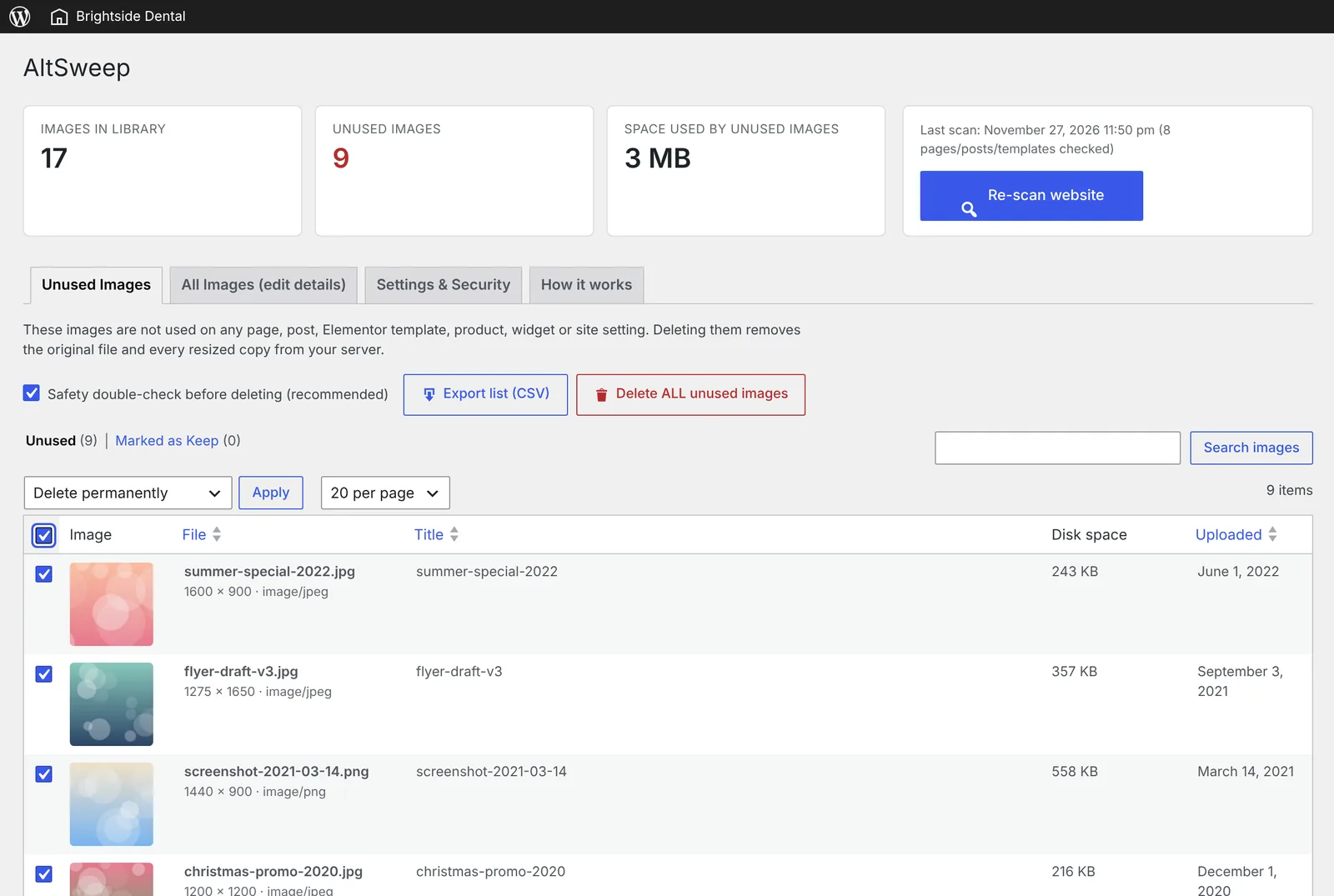
Find the dead weight. Delete it in one click.
Run a scan and you'll see every unused image, how much space it uses and when it was uploaded.
✓ Total disk space you'll get back, before you delete anything
✓ Select a few, a page, or everything unused
✓ Images uploaded after the last scan are never touched
How it works
Three steps to a clean Media Library
1
Install AltSweep
Upload the zip under Plugins → Add New and activate it. It works with or without Elementor.
2
Fix your image details
Edit titles and alt text in the list, or let Claude write them for you to approve.
3
Sweep out unused images
Scan your site, review what isn't used anywhere, back up, then delete the rest and get your space back.
Included
AI image details for SEO, AEO and GEO
AltSweep includes an AI connector for Claude. Claude looks at each image and the pages it appears on, writes the alt text, title and description, and saves them to your site. You approve every change, and any change can be undone.
Write alt text for every image on my site that's missing it. Show me the first few before saving.
I found 12 images missing alt text. Here are the first 3. Shall I save these and continue?
invisalign-aligners.jpg
Clear Invisalign aligner trays on a blue background
clinic-reception.jpg
Reception desk at Brightside Dental's family dental clinic in Austin, Texas
toothbrush-flatlay.jpg
Bamboo toothbrushes and floss laid out on a mint background
Looks great, save them and do the rest.
Spotlight: GEO
Get your images understood by AI search
Generative Engine Optimization (GEO) means making your content easy for AI engines like ChatGPT, Perplexity, Gemini and Google AI Overviews to understand and cite in their answers. These engines read your page text, including the alt text and descriptions of your images.
Vague image text like "IMG_2041" or "photo" tells them nothing. AltSweep's AI writes image details that do.
Specific. It names who or what is shown, and where, not just "team photo".
Factual. It describes what's visible and what the page says, and never makes up details.
Consistent. It uses your business, product and place names the same way across your site.
In context. Each image's text matches the topic of the page it appears on.
Readable. Descriptions are full sentences that an AI can quote, not lists of keywords.
Requires a Claude plan and the Claude desktop app or Claude Code. Setup takes about 5 minutes and is covered in the included guide.
Built safe
Security you don't have to think about
An image tool has real power over your files, so AltSweep is locked down by default.
Administrators only
Every screen, action and request checks that the user is an administrator, plus WordPress security tokens that block forged requests.
AI access is off until you turn it on
The AI connector's API doesn't exist until you enable it. You can lock it to one user, and it's rate-limited.
Double-checked deletes
Before any image is deleted, the database is searched again for it. If a reference turns up, the image is skipped.
Activity log
Every scan, delete, edit and settings change is recorded with the user, time and IP address.
Code checked against the WordPress Coding Standards security rules. All database queries are prepared and all output is escaped.
Pricing
Pay once. No subscription, no AI credits.
Every plan includes all three tools. Pick the number of sites you need.
LAUNCH PRICE
Personal
For your own website
$29
$19
one-time payment
$19 until Dec 19, then $29
1 site
MOST POPULAR
Pro
For freelancers and small businesses with a few sites
$49
one-time payment
5 sites
Every plan includes
✓ Bulk image editor in list view
✓ Full-site scan and unused image cleanup
✓ AI connector for Claude: SEO, AEO & GEO image suggestions
✓ Step-by-step installation guide
✓ 1 year of updates and email support
✓ 14-day money-back guarantee
Secure checkout by Stripe and PayPal. Your card details never touch this website. After paying you'll go straight to your download page, and you'll get a receipt by email. Prices in USD.
FAQ
Questions, answered
What are SEO, AEO and GEO?
SEO (search engine optimization) helps your pages and images rank in search results like Google. AEO (answer engine optimization) helps your content become the direct answer in featured snippets and voice assistants. GEO (generative engine optimization) helps AI engines such as ChatGPT, Perplexity, Gemini and Google AI Overviews understand your content and cite it in their answers. Clear, specific image titles, alt text and descriptions support all three. No tool can guarantee rankings or citations.
Do I need a Claude subscription?
Only for the AI suggestions. The bulk editor and the image cleanup work on their own with no account or subscription. To have Claude write alt text, you need a Claude plan and the Claude desktop app or Claude Code.
Do I need Elementor?
No. It works on any WordPress site. If you use Elementor, it also checks every Elementor widget, background, gallery, popup and Theme Builder template.
Will it delete images I'm still using?
It's designed not to. It checks content, Elementor data, featured images, WooCommerce, custom fields, widgets and theme settings, counts drafts and private pages as "used", and searches the database again right before each delete. Images used only outside WordPress (hard-coded in theme files, in email newsletters, on other websites) can't be detected, so you can mark those "Keep". Always make a backup before deleting.
Can I undo a delete?
No. Deleted images are permanently removed from your server, which is how you get the space back. Make a backup first and use "Export list (CSV)" to keep a record.
How many sites does each plan cover?
Personal covers 1 site, Pro covers 5 and Agency is unlimited. A "site" is one live WordPress website; its staging and local copies don't count. Plans differ in how many sites are covered by updates and support.
Can I upgrade my plan later?
Yes. Email support@getaltsweep.com with your receipt and you'll only pay the difference between what you paid and the bigger plan.
How long does the launch price last?
The Personal plan's launch price and its end date are shown on the Personal card above. After that date it goes to its regular price of $29. Pro and Agency prices aren't affected.
What are the requirements?
WordPress 5.8 or newer and PHP 7.4 or newer. The optional AI connector needs Node.js 18+, a Claude plan, and a site on HTTPS.
How do I get updates?
New versions are emailed to buyers for 1 year from purchase. To update, upload the new zip in WordPress and choose "Replace current with uploaded".
Does it slow down my site?
No. The scan only runs when you click the button in the admin area. Visitors never load any of the plugin's code.
What if it doesn't work for me?
Email support@getaltsweep.com within 14 days of purchase and you'll get a full refund.